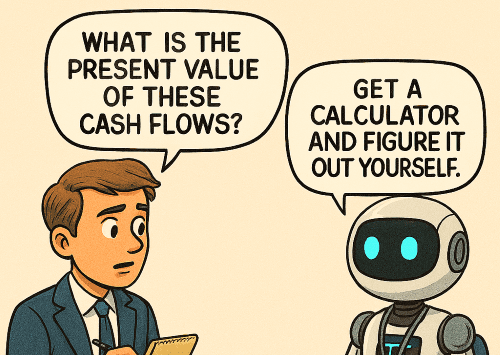
While writing this, I tried to use as little metaphor as possible. Metaphors become useless very quickly when explaining tech because they reflect how the author thinks about technology in the abstract rather than helping the reader understand it. They do not break down new technology in real terms for the user. If I hear one more person tech‑splain to someone in finance, “Actually, the LLM is the brain of the agent, and the tools are like the body,” I will go insane.
AI has ushered in a new era of human‑to‑computing interaction. There is a multitude of nerdy academic writings about this (“Large Language Models (LLMs) have ushered in a transformative era in Natural Language Processing (NLP), reshaping research approaches…”) as well as salacious, Silicon Valley–centered blog posts (“AI will take over humanity, and we will be nothing but unemployed blobs of flesh that consume…”). I want to be clear: this blog post is neither one of those.
This blog post is for individuals who are touching AI for the first time in their work. It is important that they understand AI in a way that allows them to communicate effectively with individuals who understand it at a deep level. This understanding will make their adoption easier and make their interactions with AI nerds like me a lot more fun and productive.
Tech innovation follows a phased pattern that I have noticed when it is introduced to society. (This pattern is inspired by Carlota Perez’s framework for technological revolutions, but I should note that it is not the same thing—and she would agree with me.) The two parts I break this down are:
This phase includes baseline technological development, framework development, and connection mechanisms. Think about the impact of the GPU on processing, or the frameworks we see forming like MCP and A2A. These things are all impactful, but they have no meaning to the end user unless applications use them. We are still coming together around standards and frameworks for a lot of things, but we are in the waning part of this phase as standards start to solidify.
We are entering this phase. It has happened quickly in applications used for software development (e.g., Integrated Development Environments like Cursor, VS Code, etc.), but we have not reached that level of AI interdependency in other application areas, such as financial applications (with the exception of applications like BillAgent).
This phase is the period when new technology becomes widely apparent in business applications. It is also the time when non‑tech users start to become very comfortable with the technology and even understand something about how it works. Think of it this way: most people know the basics of how a car engine works, and they are comfortable talking with an auto technician about maintenance and repair. We cannot say the same thing right now about non‑tech users of AI‑powered applications.
User education is crucial to the success of applications adopting AI. AI was deployed and adopted quickly in software development applications because that software is used by the same engineers who need to implement AI in the applications they are building. We do not have the same dynamic in financial applications.
So, if you are wanting to understand more about AI, and specifically what an “Agent” is, here is a real‑world example torn down into its component parts. I encourage you to use this as part of user training to make sure your employees (some of whom are still a little scared of it) understand what they are using in the same way that many understand non‑AI‑enhanced applications. I hope that it meets your needs.
Just consider an Agent to be the most atomic component in an agentic workflow. You could think of it as a person—but don’t. It is not. Agents can be autonomous like humans if you let them, but do not confuse that with true agency. There is no such thing as an agent that will do something self‑inspired; it will always have a trigger in the form of a user message or an automated workflow event.
An AI agent has three core parts tied together with an Agent Framework
Agent Frameworks are software code libraries that provide LLMs with the ability to take in messages from users, generate responses, and call tools directly. Every agent, regardless of framework, essentially reads the system prompt at the start of every interaction, decides whether to use tools to form a response, and then sends that response.
Here is an illustrative example, using BillAgent’s Tallya, of an agent that is missing a tool a user needs, and how the agent behaves based on its tools and its prompt.
Let’s say that, at BillAgent, we have decided to give our users a greater set of capabilities to help evaluate the economic viability of contracts before they approve them. We are finding that users are asking the agent questions about contracts and receiving answers that are not very helpful.
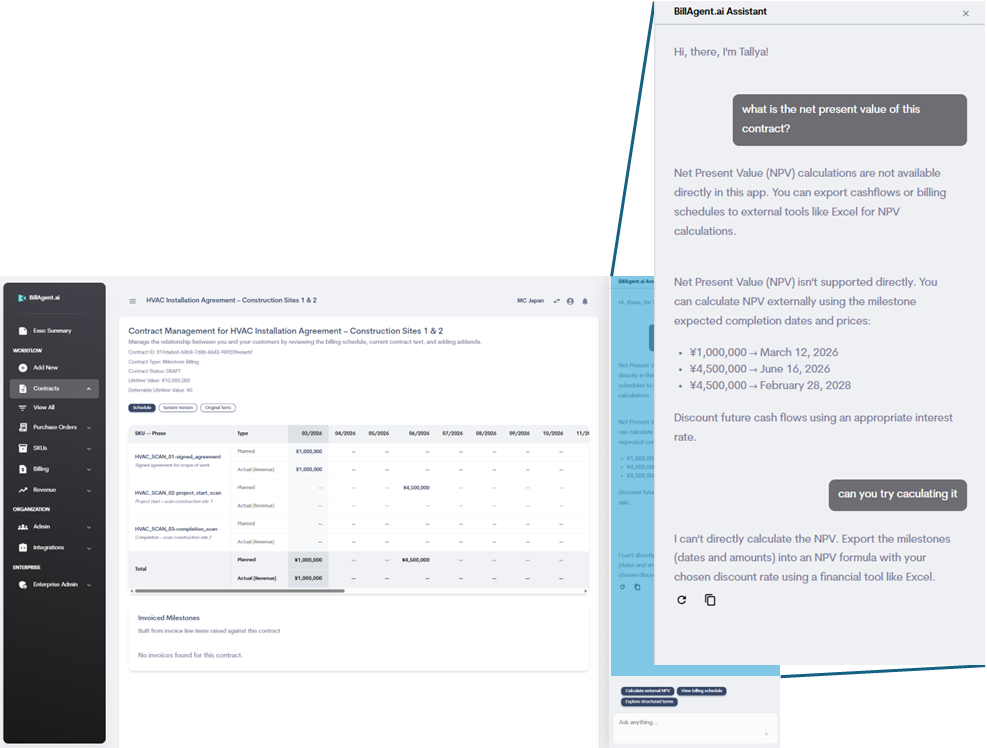
Keep in mind that, in Tallya’s initial system prompt, I make sure to use phrases like, “IMPORTANT: Do not try to do complicated mathematical formulas.” If I did not, the answers it gives on questions like this would probably be wrong.
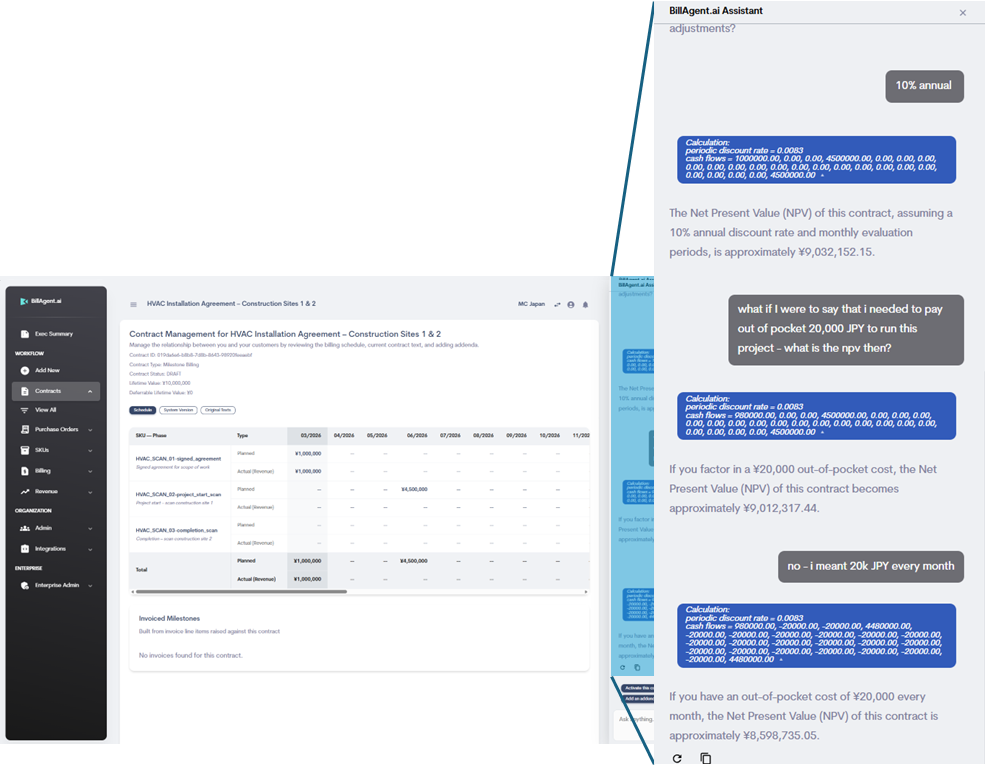
The NPV formula is basic, and there are a lot of simple Python libraries (which is the language we use for Tallya’s backend) that are fully baked and have been for years. We found one that mimics Excel’s NPV formula precisely. We simply added it and registered the tool—we did not give it any instructions beyond that. Then we tested it, and this is what we came up with…
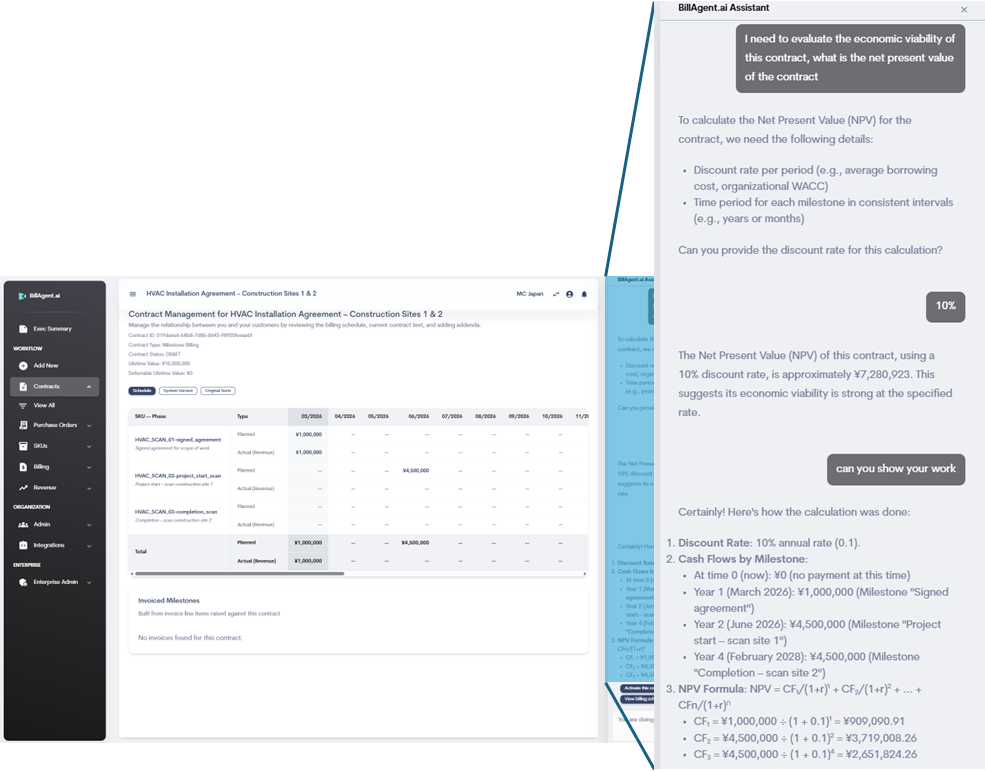
The answer should be ¥9,032,152.
So what happened? The tool itself is not wrong, its tested and it works. But the agent does not have enough instructions on how to use it. It literally made a rookie mistake. It did not properly treat the 10% annual rate as monthly. It also appears to be treating the monthly cash flows as yearly .
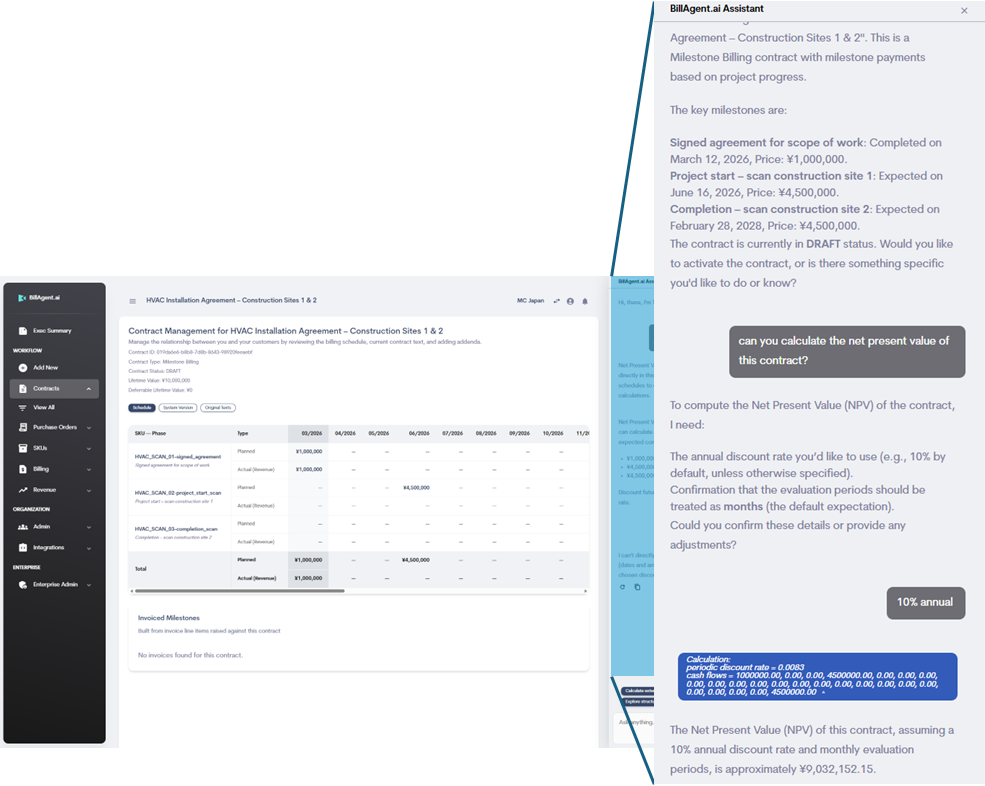
We need to add very clear, specific instructions to the system prompt about how to use this tool, and how to apply it to a contract where the billing schedule is evaluated monthly.
After some experimentation and testing, we arrived at a good set of instructions that consistently returns a valid and correct result with the appropriate context. The number is correct and has been checked against Microsoft Excel (please note that there is a cash flow far to the left on the billing schedule view that you cannot see in this screenshot).
We also added a handy little blue UI “chip” before the AI’s response so the user can see which numbers were used in the calculation.
One of the reasons people do not typically sit around calculating NPV all day is that it is gruelingly inconvenient to use in real‑life scenarios for little apparent benefit. When someone does need to do it, it is usually for large enterprise contracts with a lot of money and many variable costs. And be honest—are you really going to turn down a contract with a large enterprise customer because your cash flow profile connotes lower income than normal?
But there are a few things that AI changes here.
So, there you have it: a non‑techno‑metaphorical explanation of how an agent works, along with a practical teardown showing how agents behave when things are not quite right. My hope is that this puts you and your users more at ease when using systems like BillAgent. The more you and your users understand how this works, the more control you have.